Turn Every Order Into GST Invoice, Automatically
No end-of-day pile-up. No invoices in Sheets. Counter or online, every order raises a GST-compliant invoice the moment it's placed — so nobody waits in line for a bill.
No Advance PaymentPay Only For What You Use₹0 Setup Fee
So how does an order become an invoice?
Follow one order from the counter to your CA. Six steps — and you only do the first one.
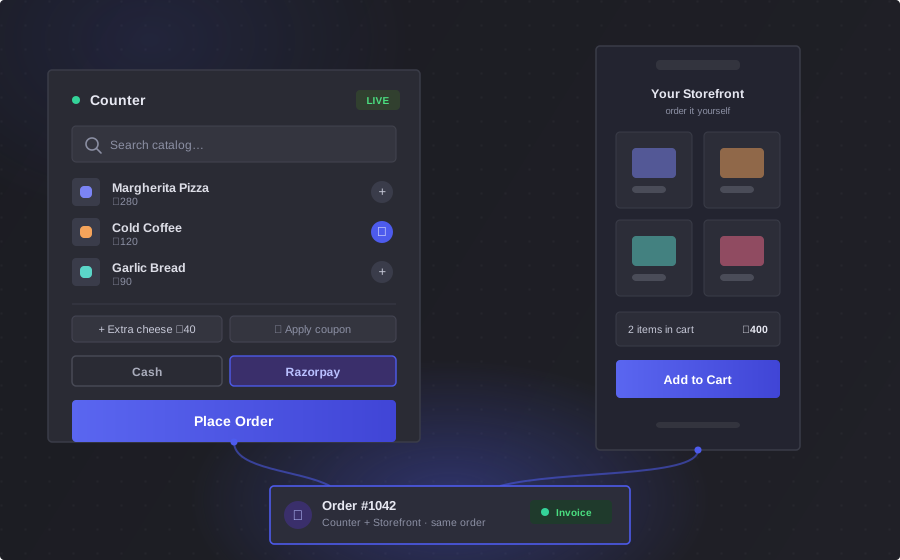
It starts the way you already sell
Take the order at your counter — search your catalog, add on extras, apply a coupon, pick cash or Razorpay, place the order. Or switch on your storefront and let customers order themselves. Both arrive as the same order.
The moment you hit Place Order, the invoice already exists.
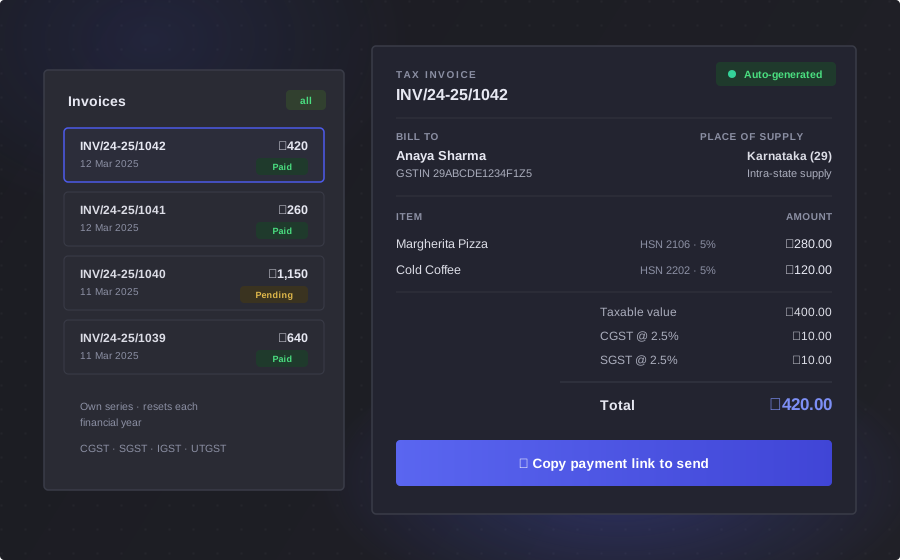
The invoice is already made
Not at closing time — at the moment of the order. Numbered in your own series, resetting each financial year, with CGST, SGST, IGST or UTGST worked out from the place of supply, and a link you can send the customer straight away.
It knows which tax to charge because your catalog and your customer already told it.
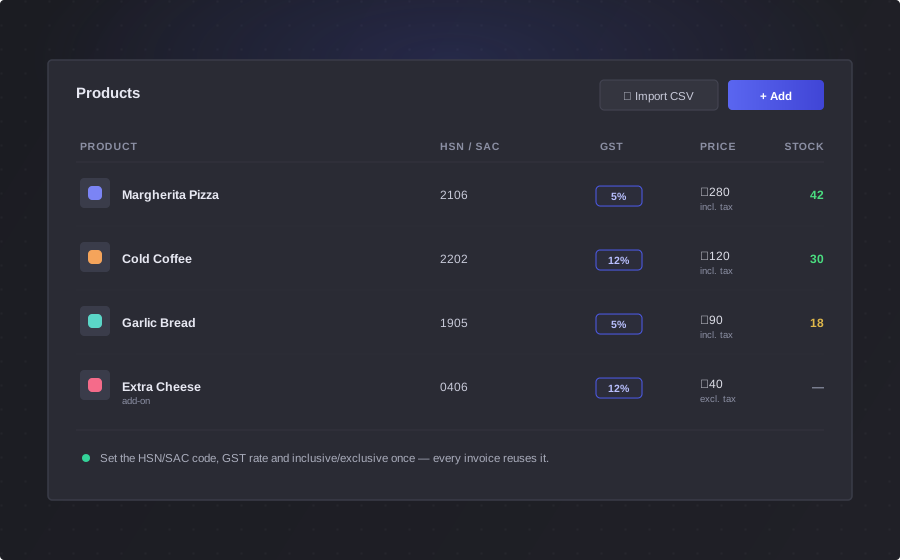
Set the tax once. Never think about it again.
Every product carries its HSN or SAC code, its GST rate, and whether the price is inclusive or exclusive. Type them in, or import your whole catalog from a spreadsheet. Turn on inventory tracking and stock is deducted with every order.
That is half the answer. The other half is who you are selling to.
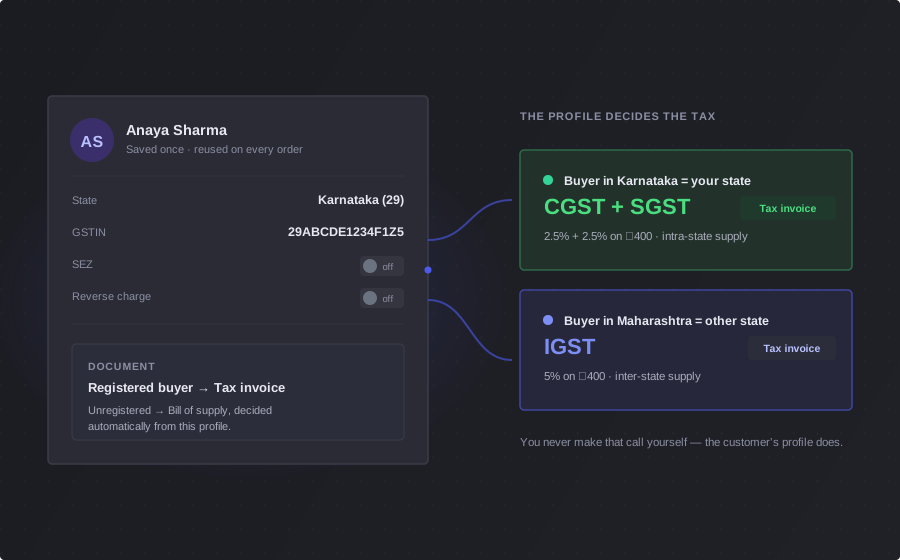
Your customer's tax profile travels with them
Add a customer once with their state, GSTIN, and any SEZ or reverse-charge flag. Every order after that reuses it — and that is what decides CGST + SGST or IGST, tax invoice or bill of supply. You never make that call yourself.
Now the part that actually matters — getting paid.
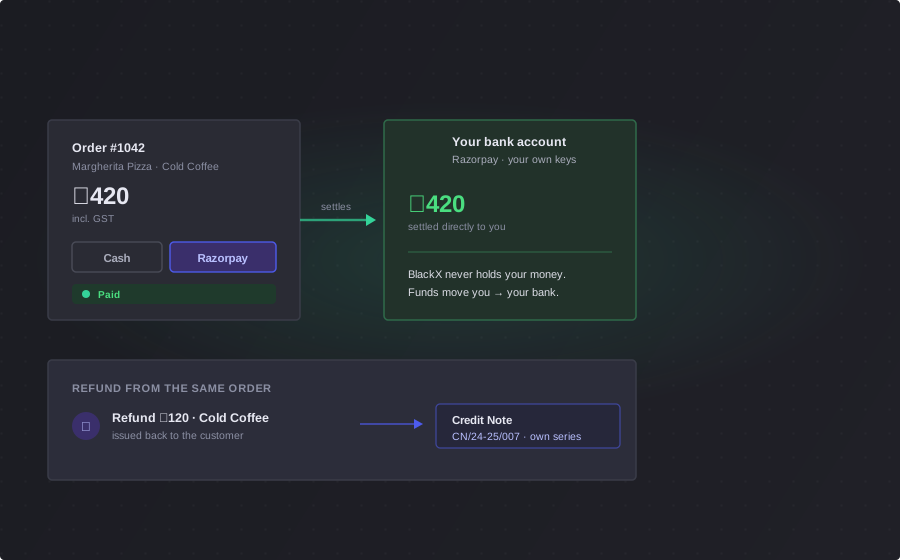
The money reaches you, not us
Cash at the counter, or online through your own Razorpay account — your keys, so funds settle directly into your bank. BlackX never holds them. Refunds and GST credit notes are issued from the same order, numbered in their own series.
Which leaves one thing: the end of the month.
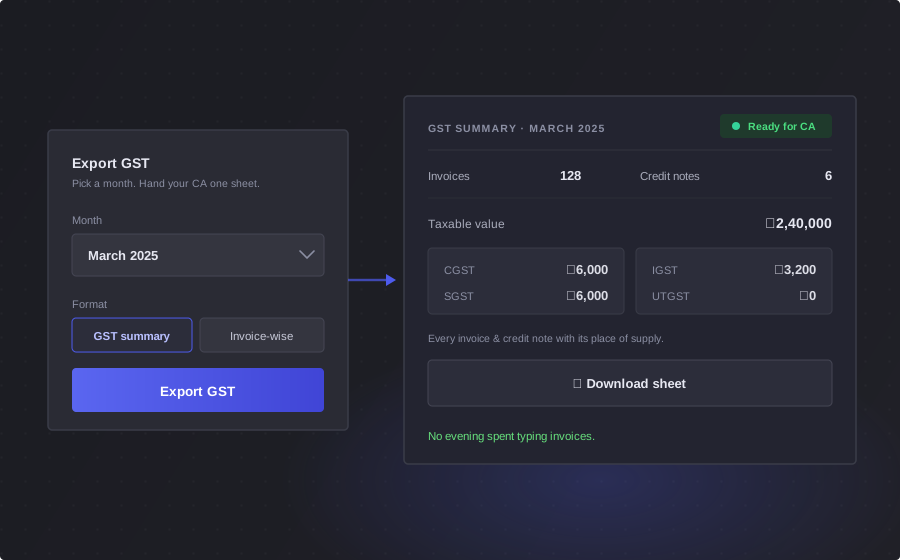
There's nothing left to catch up on
No evening spent typing invoices. Pick the month, hit Export GST, and hand your CA one sheet — every invoice and credit note with its place of supply and the full CGST, SGST, IGST and UTGST breakup.
Bill the counter without slowing it down
Products on one side, the cart on the other. Add what they're buying, take the payment, and the order is done — GST invoice included.

Start with the customer
Pick the customer, then ring up the sale. Their state and GSTIN are already on file, so the invoice is taxed correctly without you choosing anything.

Products one side, the bill the other
Search the catalog, add products and add-ons, apply a coupon. The bill totals up sub-total, discount, and the CGST/SGST/IGST split live as you go.

Take payment, place the order
Cash or Razorpay, confirm the shipping address, place the order. The GST invoice is raised the moment you do — nothing to fill in afterwards.
That's the counter. But an order doesn't only come from the counter.
Your counter closes. Your store doesn't.
Switch on your storefront and the same catalog goes online. Customers place the order themselves — and it arrives in the very same list as your counter sales.

The same catalog
Nothing to rebuild. The products, prices, add-ons, and tax rates you already set up are what customers see online.

They order themselves
Customers sign in with a one-time code sent to their email, fill their cart, add a shipping address, and pay through your own Razorpay account.

Open when you are
Run it around the clock, or set your business hours. Outside them the store simply stops taking orders — no one places an order you cannot fulfil.
An online order raises the same GST invoice as a counter order. Same numbering, same tax split, same export.
Every order, tracked to the finish
Placing the order is the start. From there it moves through your fulfilment — and everything it touches stays attached to it.
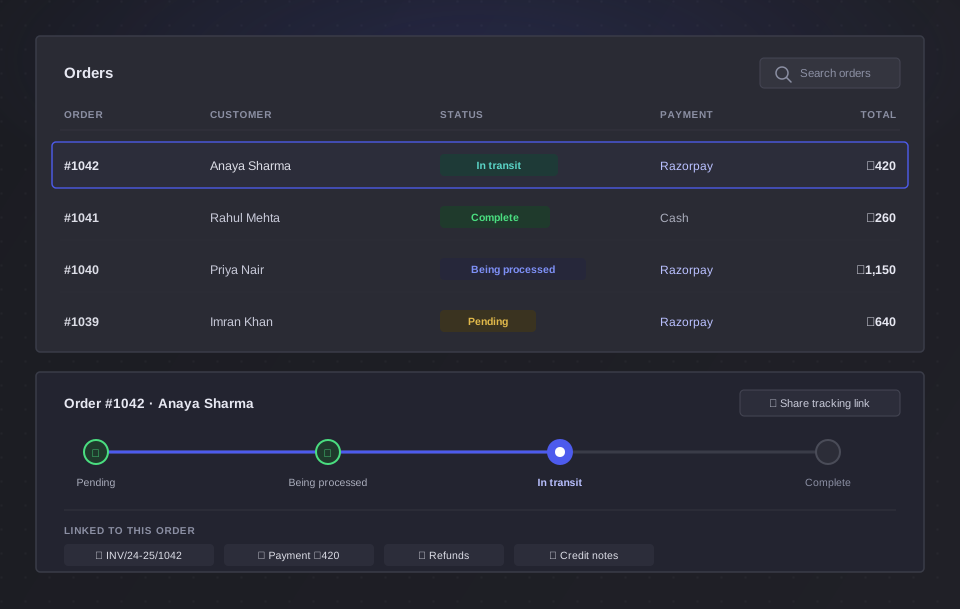
A status for every stage
Each order carries its own number and a shareable tracking link, and moves through four clear stages:
All linked to the order
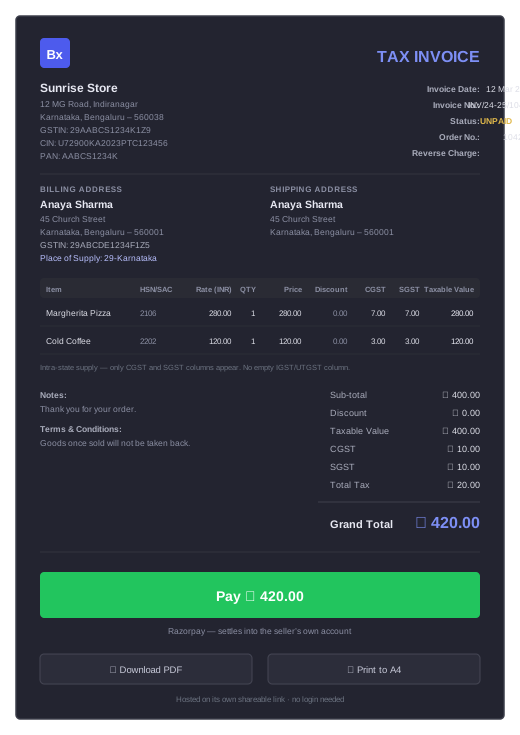
Not just an invoice — the right invoice
Whoever you are registered as, and whoever you sell to, BlackX issues the document the law expects — you never pick a tax type or a template by hand.
- Tax invoice, bill of supply, or plain invoice — issued automatically from your GST registration type
- Reverse charge, SEZ zero-rated, and export supplies each carry the correct treatment and statutory note
- Tax-inclusive or tax-exclusive pricing, with HSN/SAC codes and correct rounding on every line
- Each invoice gets a shareable link with a Pay button wired to your own Razorpay account
Simple. Transparent. Usage-based.
No fixed monthly plans. No contracts. You pay only for the resources that were active in your store during the billing month.
Questions shop owners ask us
Do I need a GST number to use BlackX?
No. You can bill without GST registration and BlackX will generate regular invoices. If you are registered — regular or composition scheme — it generates the correct tax invoice or bill of supply automatically.
What if most of my customers pay cash or UPI?
Cash and UPI are fully supported at the counter. For online payments, customers pay through your own Razorpay account — the money settles directly with you, not with BlackX.
Can I bring my existing products into BlackX?
Yes. Import your whole catalog from a CSV or Excel file — names, prices, HSN/SAC codes, tax rates, and stock — using the built-in template. Your products come in ready to bill, so there is nothing to retype when you switch.
How much does it cost?
You pay only for what actually sold. ₹10 a month for each product, add-on or bundle that was part of an order, and ₹1 for each customer who ordered — billed at the end of the month, exclusive of 18% GST. Nothing upfront and no fixed plans, so a month with no orders costs ₹0. Use the pricing calculator to estimate your bill.
Can I stop using BlackX anytime?
Yes. There are no contracts, cancellation fees, or notice periods. You are only billed for usage up to the point you stop, and you can export your invoices before you go.
Is my business data safe?
Your data is stored on AWS cloud infrastructure, and sensitive credentials like payment gateway keys are stored encrypted. Your invoices and reports are exportable by you at any time.