Ring it up. The GST invoice is already done.
Pick the customer, tap through your catalog, place the order. The tax works itself out as you go — and the invoice is raised before the customer has put their card away.
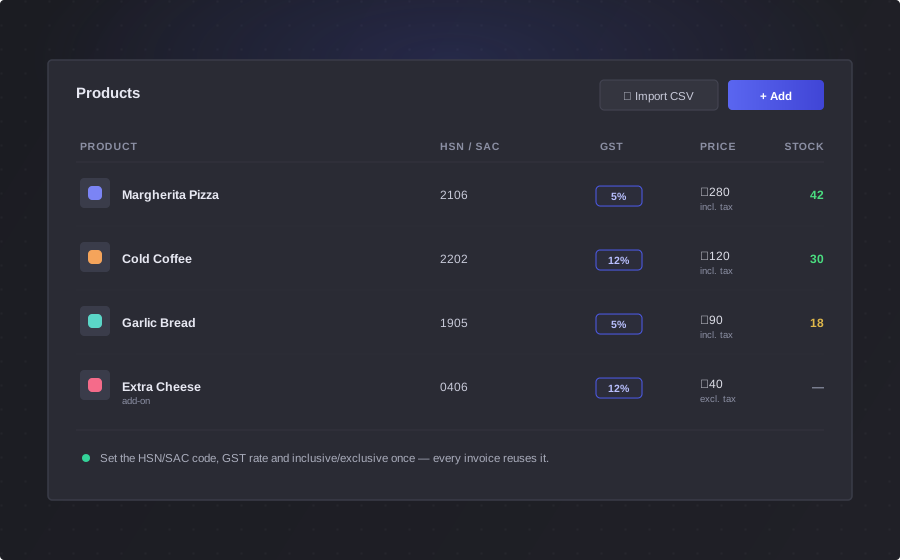
Catalog on the left, the bill on the right
One screen, no menus to dig through. Everything you need to put a bill together is in front of you.
Your catalog, two taps away
Products and Product Groups sit in their own tabs, each with a search box. Tap a tile and it's on the bill.
You can't bill what you don't have
Anything out of stock is marked and can't be tapped at all. A bundle locks if even one product inside it has run out.
Add-ons when they're needed
Tap a product that has add-ons and the picker opens. Tap one that doesn't and it goes straight on the bill.
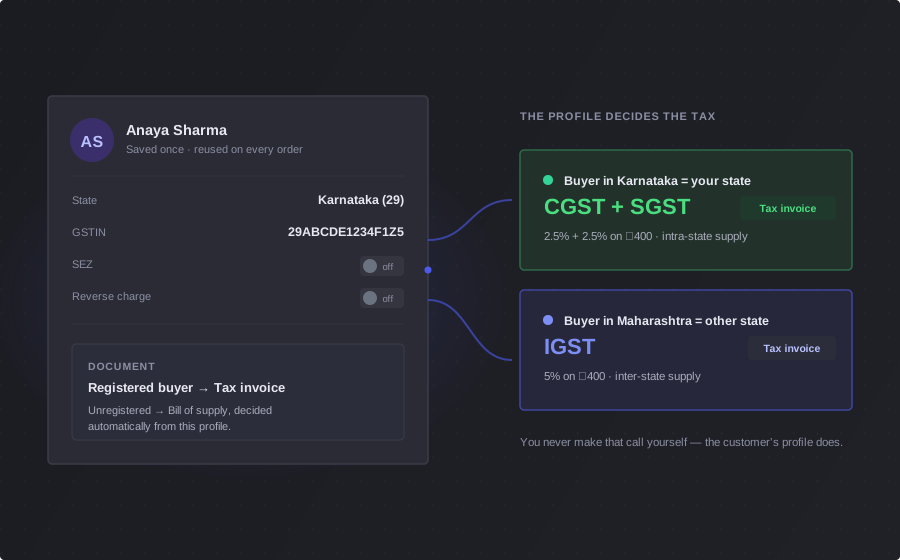
The bill belongs to the customer, not the screen
Pick who you're billing and everything else follows from them. Their state and GSTIN decide the tax — you never choose a tax type at the counter.
- Start a bill, serve someone else, come back — it's still there, waiting under their name
- Their SEZ or reverse-charge flag is applied for you, without a second thought
- Billing a walk-in? Mark it pickup and skip the address entirely
Bill Details:
The tax adds up while you're still scanning
Every item you add re-runs the bill. No calculator on the counter, no tax worked out at closing time — the number the customer pays is right the whole way through.
- CGST and SGST inside your state, IGST across state lines, UTGST in a union territory — only the ones that apply ever show up
- Price your products with tax included or on top; the taxable value is worked back either way
- Discounts, tax and total all recalculate the moment anything on the bill changes
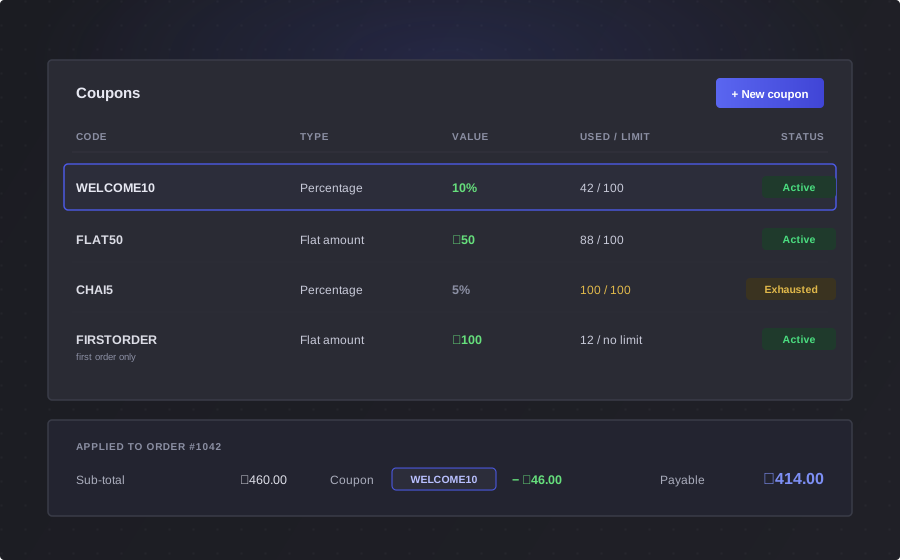
Real bills aren't just a list of products
Add-ons
Pick as many as you need, or none at all — and change them after the item is already on the bill. They ride along on the product's line at its own tax rate.
Bundles
A Product Group bills as a single line, at the group's own price, HSN code and tax rate — not as a pile of separate items.
Coupons
Apply a coupon to any line on the bill. Flat or percentage, with a minimum cart value, a cap on how much a percentage can take off, and eligibility by customer or product.
It won't let you bill the wrong price
Someone edits a price while a bill is sitting open on your counter. Most tools would let you charge the old one. BlackX stops the order until you've looked.
Cart prices have changed
Some item prices in this cart were updated. Please review before placing the order.
It watches more than prices — a tax rate, a customer's state, a delivery address, even your own GST registration. Anything that moves the number gets flagged before it reaches the customer.
Over the counter, or out for delivery
The same screen bills both — and where the goods land is what decides the tax.
Counter sale
Choose “No Shipping Address — pickup / delivery not required” and bill them where they stand.
Delivering it
Pick one of their saved addresses — or add a new one right there in the cart, without losing the bill you've built.
Another state? The tax moves
Deliver across a state line and the bill re-splits from CGST + SGST to IGST on its own — and tells you it did.
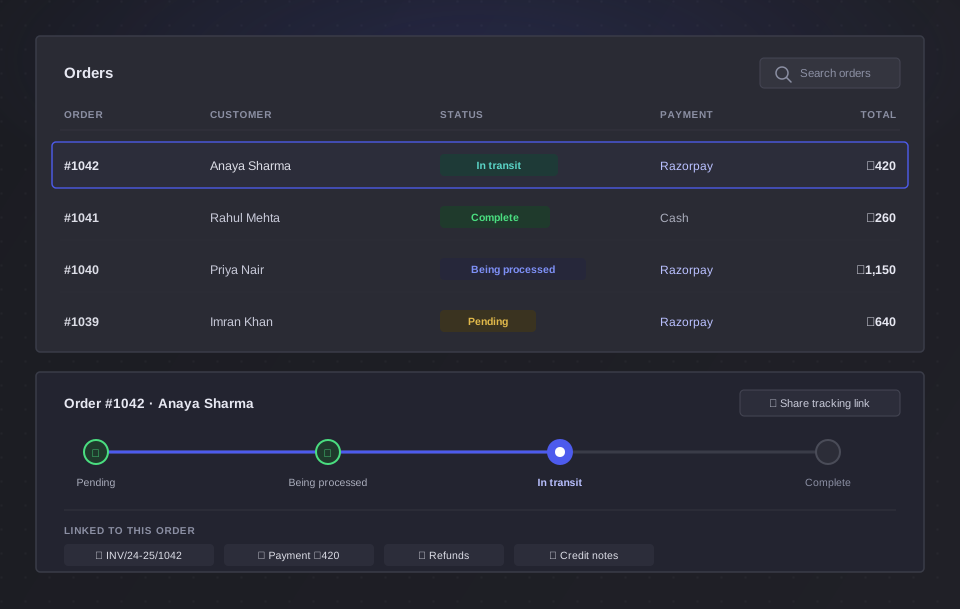
One last look, then it's an order
Preview the whole bill line by line — rate, quantity, discount, tax and total, with the add-ons and coupon shown against each item. Then place it.
- Set your own prefix and the number to start from — the preview shows you the format before you save
- The GST invoice is raised in the same moment, in its own numbered series
- The bill clears itself off the counter, ready for the next customer
However they want to pay you
The bill is placed and the invoice exists. Now it's just a question of taking the money — and it comes to you, not through us.
Cash at the counter
Take the notes and mark the order paid from your orders list. It lands in your transactions against that order.
Or send the invoice
Every order already has its GST invoice with a shareable link — and a Pay button on your own Razorpay account, so the money settles directly with you.
It's all on the order
Payment, invoice, status and any later refund or credit note stay attached to the same order. Nothing to reconcile by hand.
Counter billing questions
Do I need a customer for every sale?
Yes — every bill is attached to a customer, and that is what makes the tax correct. You add them once with their state and GSTIN, and every bill after that is taxed right without you thinking about it. For a walk-in who is not taking delivery, choose “No Shipping Address — pickup / delivery not required”.
Can I bill if I'm not GST registered?
Yes. BlackX issues the document that matches your registration — a plain invoice if you are unregistered, a bill of supply if you are on the composition scheme, and a full tax invoice if you are a regular dealer. If you cannot charge GST, the tax fields simply do not appear.
Can I use it on a tablet or a phone?
The billing screen is built for a desktop or laptop at your counter — the catalog and the bill sit side by side, which needs a wide screen. It still opens on smaller screens, with the catalog above and the bill below, but it is not a touch-first tablet till.
How do discounts work?
Through coupons, applied to any line on the bill. You can set a flat amount or a percentage, a minimum cart value before it applies, a cap on how much a percentage discount can take off, and limit it to certain customers or certain products.
What if a price changes while a bill is open?
BlackX stops you. If a product's price or tax rate changes while that bill is sitting on your counter, the cart flags exactly what changed — old value and new — and will not let you place the order until you have looked at it and confirmed.
How do I take the payment?
Place the order and the GST invoice exists straight away. Take cash and mark the order paid, or send the customer the invoice link, which carries a Pay button connected to your own Razorpay account so the money settles directly with you.