Set your catalog up once
Products, bundles and add-ons in one place — with the tax already worked out, and every last movement of stock written down.
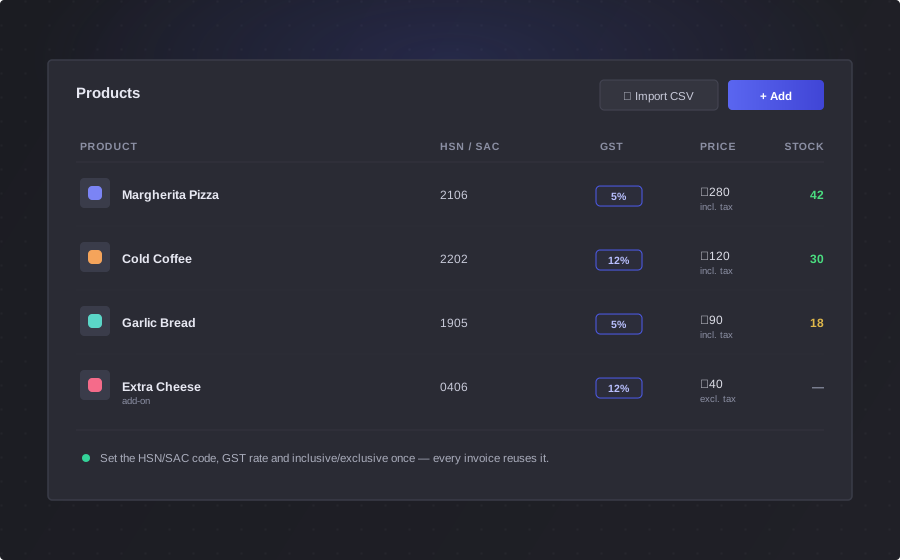
Everything a product needs to know about itself
Fill it in once and it's right on every screen it ever appears on.
The details that matter
Name, price, description, UPC, HSN or SAC code, unit of measure, and a picture. Stopped selling it? Mark it inactive — your past invoices keep their history either way.
The tax, worked out for you
Price it with tax included or on top. BlackX works out the taxable value, the tax amount and the final price every time you save — so you're never keeping two prices in your head.
It carries everywhere
The same product bills at your counter, shows on your storefront, and lands on the invoice — at the same price, at the same rate.
Cold Brew 250ml — Stock (42)
Stock History
Stock is a ledger, not a number
In most tools stock is a box someone types over, and by Thursday nobody knows why it says what it says. Here you can't type over it at all.
- Adding or removing stock is a transaction — a quantity, a credit or a debit, and a note saying why
- Opening stock, a sale, a cancellation, a correction — all of it on the record, filterable by type or date
- Sales write themselves in, naming the order that moved the stock
- Cancel an order and it comes back, credited against that cancellation
Track only what's worth tracking
Counting everything is how people give up on inventory. Count the things that matter and leave the rest alone.
Per product, off by default
Turn it on for the things you actually count. A service, or something you make to order, doesn't need a stock number following it around.
On and off cleanly
Switch it on and stock starts at zero, with a transaction saying so. Switch it off and the number goes away instead of sitting there going stale.
Out of stock actually stops you
It can't be tapped at the counter, and it shows as out of stock on your storefront. Not a warning you can click past.
Sell it as a set, or sell it with extras
Real shops don't only sell one thing at a time.
Bundles
Group products together and price the bundle on its own terms — its own price, its own HSN code, its own tax rate, not the sum of its parts. Sell one and every product inside it comes out of stock.
Add-ons
Attach the extras to a product — an extra shot, gift wrap, installation. They keep their own stock and their own history, and they're taxed at the rate of the product they're sold with.
Set it once, not every time
Most shops sell one kind of thing, at one rate, in one unit. So say that once and stop retyping it — every new product starts already filled in.
- Your usual HSN or SAC code, unit of measure, tax type and rate, and whether new products go live straight away
- Change it on the product when something's different — the default is a starting point, not a rule
- Bundles and add-ons get their own defaults, on their own tabs
Errors
Row 14: price: Ensure this value is greater than or equal to 1.
Row 22: name: Product with this name already exists.
Row 37: tax_percentage: Ensure this value is less than or equal to 100.
Bring the catalog you already have
Your products are already in a spreadsheet somewhere. Nobody is retyping four hundred rows to try something new.
- CSV or Excel, with a template to download so the columns are right the first time
- Names, prices, HSN/SAC codes, units, tax type and rate, stock and status — all in one go
- Anything that fails is called out by row number and field, in plain words
- Fix those rows and import again — the ones that worked stay where they are
Catalog questions
Do I have to track stock for everything?
No. Inventory tracking is switched on per product, and it's off to begin with. Turn it on for the things you actually count and leave it off for services, or anything you make to order — those don't need a stock number following them around.
Can I bring my existing products in?
Yes — import them from a CSV or Excel file. Download the template so the columns line up, and everything comes in at once: names, prices, HSN/SAC codes, units, tax type and rate, stock and status. Anything that fails is reported row by row, so you fix those rows and re-import while the rest stay put.
What happens when I sell a bundle?
Every product inside it comes out of stock, each one written into its own history against that order. Cancel the order and it goes back the same way.
Does BlackX look up HSN codes for me?
No — you enter the code on the product yourself, and you can set a default so it fills in for you on every new one. If you need to find a code, use our free HSN/SAC lookup tool: it searches 21,000+ codes and gives you the GST rate.
Can I price with tax included?
Yes. Set a product as tax-inclusive and the price you type is the price the customer pays, with the tax worked back out of it. Set it as tax-exclusive and the tax is added on top. Either way BlackX stores the taxable value and the tax amount for the invoice.
Can I delete a product?
You mark it inactive instead. It stops selling at your counter and on your storefront straight away — but it stays on the invoices you've already issued, which is exactly where it needs to be if anyone ever asks about that sale.