Your shop, open at your own link
The same catalog you bill from at the counter, online — where your customers order and pay for themselves, and every order lands in the same place.
There's nothing to rebuild
Your storefront isn't another product to learn. It's the shop you already have, with a front door on it.
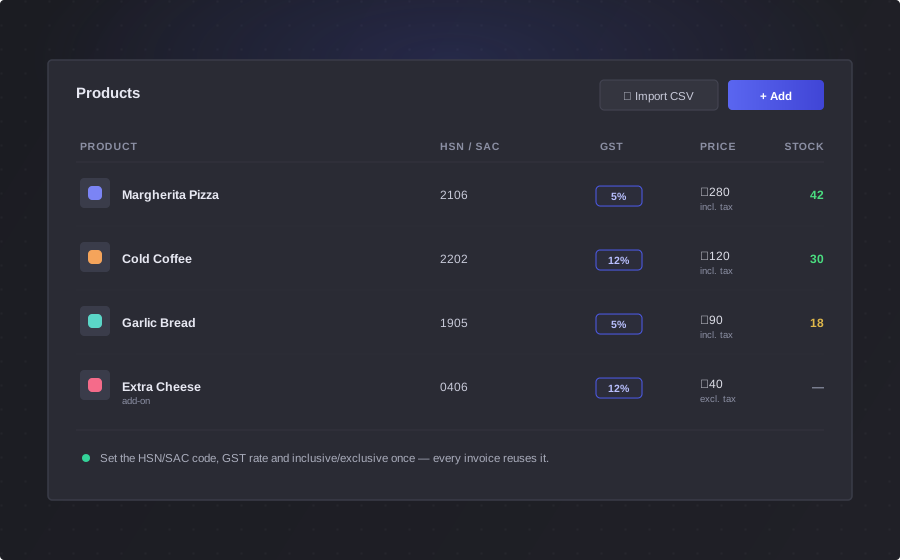
The catalog you already have
Your products, your bundles and your add-ons appear online exactly as you set them up. There is no second catalog to keep in step.
Prices and tax come with them
The same HSN or SAC code and the same tax rate you set once. Priced with tax included or on top — either way it lands correctly online.
Nothing to build
No website project, no theme to choose, no developer to brief. Your store is there from the day you're set up.
Five steps, and none of them are yours
You don't take the call, write it down, or key it in. They do the whole thing and it arrives finished.
Looking is free
No sign-in to browse. Tiles show the picture, the price, an add-ons badge, and an out-of-stock marker when you've run out — in a grid or a list, however they like it.
Add-ons, priced as they pick
The same add-ons you offer at the counter, with the total moving as they tick them — so there's no surprise at the end.
A cart that behaves
Change a quantity, take something out, apply a coupon code to a line. It's the cart people already know how to use.
No password. Just their email.
Nobody abandons a cart because they forgot a password they made up eight months ago. A six-digit code goes to their inbox and they're in for the day.
- Nothing to create, forget, or reset — and nothing for you to support
- First-time buyers give their state and city up front, so their very first order is taxed correctly
- Every order you receive comes from an email address that has actually been verified
Order Summary
Your customer sees the same tax you'd have charged
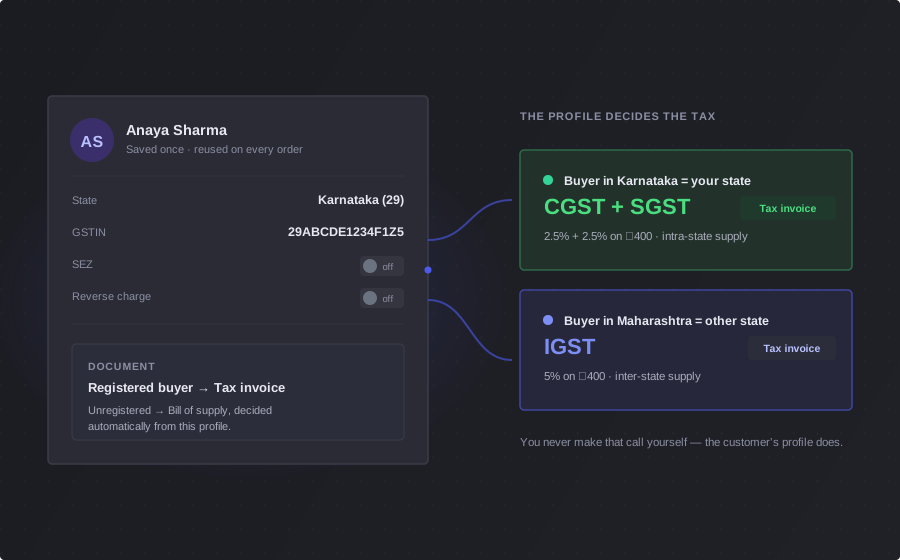
An online order runs through the same GST engine as your counter. The breakup is in front of the customer before they pay — not a surprise on the invoice after.
- Only the components that apply are shown — CGST and SGST in your state, IGST across state lines
- Businesses save their GSTIN and how they should be taxed — Regular B2B, SEZ, or reverse charge — on their billing details
- Change the delivery address and the split re-flips there and then
- Zero-tax is explained rather than left blank, so nobody thinks you forgot to charge it
And if the tax changes while they're checking out, the order stops until they've read it again. They can't pay one number and be invoiced another.
See how the GST engine worksEvery product has its own link
Someone asks “do you have this?” — send them the thing itself, not a screenshot and a price typed underneath.
Every product and every bundle gets its own short link the moment you create it, ready to copy from your product list. Paste it into WhatsApp and they land on that product, in your store, ready to buy.
Open when you say you're open
An order that lands at 2am for a kitchen that shuts at 10 isn't a sale — it's a refund and an apology. So the store keeps your hours, not the internet's.
- Run around the clock, keep the same hours every day, or set your own hours for each day of the week
- Closed on Sundays? Say so once, and Sunday stops taking orders
- Customers are told when you open again, not left guessing
- Need it gone entirely? One switch takes the whole store down
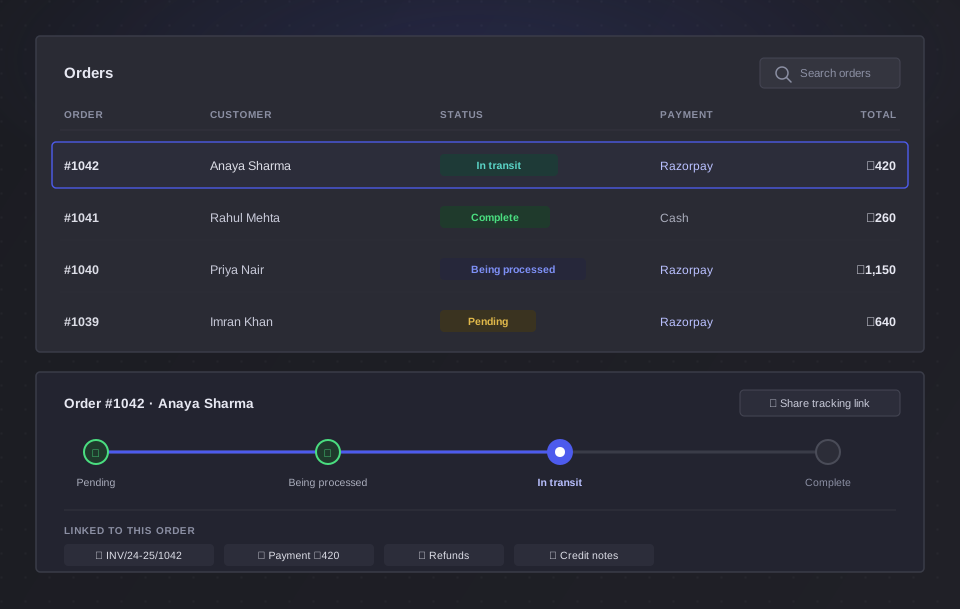
One list. Counter and online, together.
An online order isn't a different kind of order. It's the same order, in the same list, moving through the same statuses — just marked where it came from.
- The same GST invoice is raised automatically, in the same numbered series as your counter sales
- Unpaid orders carry a Pay button for the customer, on your own Razorpay account
- Refunds and credit notes work exactly as they do for a sale you rang up yourself
- Your month-end export doesn't care which door the order came through
Storefront questions
Do I need a website for this?
No. Your store already exists at its own link as soon as you're set up — there's no site to build, no theme to choose and no developer to brief. You share the link, and customers order from it.
Do my customers need to create an account?
There's no password to create. They enter their email, get a six-digit code, and they're in — the sign-in lasts a day. Browsing is completely open; the code is only needed once they start a cart. It also means every order you receive comes from an email address that has been verified.
Can I stop taking orders at night?
Yes. Set your store to run around the clock, to the same hours every day, or to your own hours for each day of the week — including days you're closed. Outside them the store won't accept an order, and tells the customer exactly when you're open again.
Do I need a Razorpay account?
For customers to pay online, yes — and the payment runs through your own Razorpay account, so the money settles directly with you. Without it customers can still place orders; they simply arrive unpaid, and you collect the money the way you already do.
Is the storefront a separate catalog?
No, and that's the point. It's the same catalog you bill from at the counter — the same products, bundles, add-ons, prices and tax rates. Change a price once and it changes in both places.
How do customers find my store?
You bring them to it. Share your store link, or share the link to a single product straight from your product list — every product and bundle has its own link and a short link ready to copy. Send it on WhatsApp and the customer lands on that product, in your store, ready to buy.