Add them once. Every invoice after that is right.
A customer record here isn't a contact card. It's the tax profile that decides what you charge them and what their invoice says — for good.
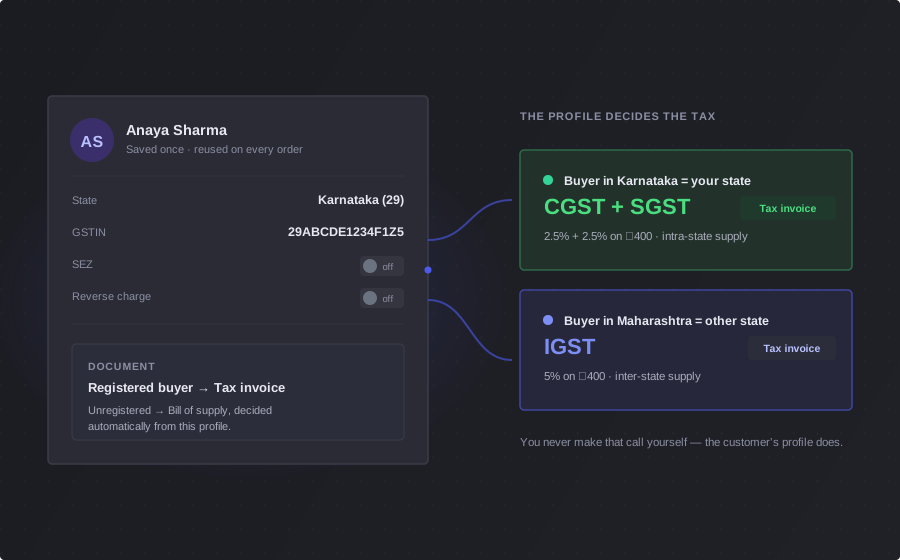
Three answers decide every invoice they get
Get these right once, on the day you add them, and you never think about their tax again.
Their state
CGST and SGST inside your own state, IGST across a state line, CGST and UTGST in a union territory without its own legislature. Picked from a real list, not typed in and hoped for.
Their GSTIN
Goes on the invoice, and tells BlackX you're selling to a business rather than a walk-in — which is what lets them claim the credit.
SEZ or reverse charge
Flag it once. The supply is zero-rated, or the tax is handed to the recipient — and the statutory wording is written onto the invoice for you.
A wrong GSTIN doesn't get saved
Most billing tools take whatever you type into the GSTIN box. A transposed character sits there quietly until your customer can't claim their credit.
- BlackX checks the shape and recalculates the checksum digit — a typo is caught while you're still looking at the screen
- It won't let you save half a tax profile: mark someone SEZ and you have to say which kind; mark them reverse-charge and a GSTIN becomes mandatory
- Stop being an SEZ unit and the SEZ type clears itself out, rather than lingering on the record
Where it ships changes the tax
A customer billed in Bengaluru and delivered to in Mumbai isn't the same sale. BlackX knows the difference.
Up to ten, each with a name
Head office, warehouse, the site they're building. Label them so whoever is billing knows which is which.
One is primary
Mark the one you use most and it leads. Promote another and the old one steps down on its own — you can't end up with two.
The delivery address wins
Whichever address you pick on the order is what decides the tax. Cross a state line and CGST + SGST becomes IGST, on its own.
Change it once, everything catches up
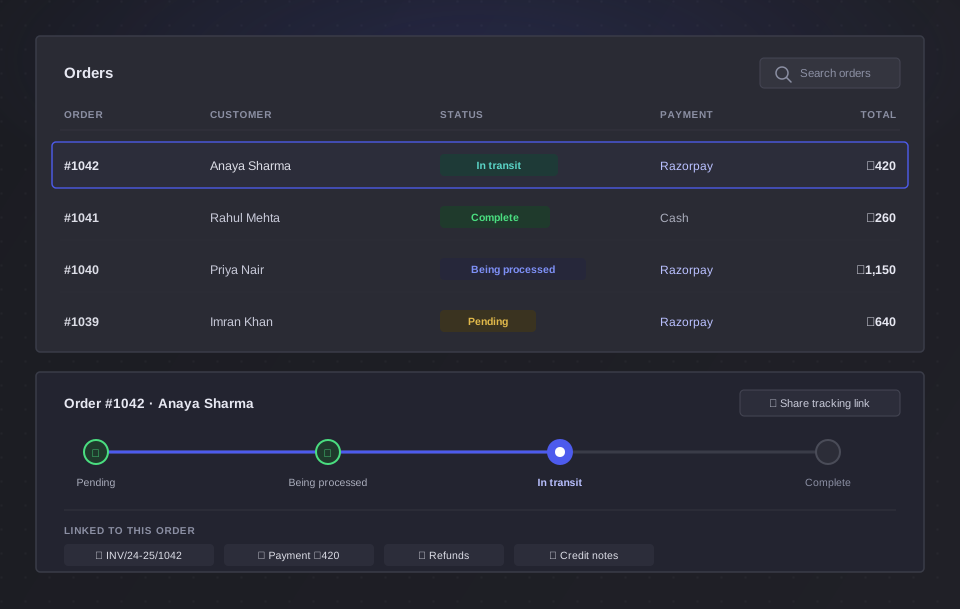
A customer registers for GST, or moves state, or turns out to be SEZ. You change it in one place — you don't go hunting for the bills already open on someone's counter.
- Change their state or their tax treatment and every open bill recalculates itself
- Anyone holding one of those bills is told the tax moved — before they can take the money for the old number
- Set a default country, state and city once, so new customers start out already right
The best data entry is the kind you don't do
Your customers know their own GSTIN and their own address better than you do. Let them type it.
They arrive on their own
Someone who signs in to your storefront lands in your customer list automatically, marked as having come from your store.
They keep it current
Their billing details and delivery addresses are theirs to maintain — you're not retyping an address off a WhatsApp message.
Businesses fill in their own GSTIN
A business buying from you enters its GSTIN and says how it should be taxed. You stop chasing it before you can raise the invoice.
Customer questions
Do I need a customer for every sale?
Yes — and that's the point. Who you're selling to is what decides the tax, so every bill is attached to someone. Add them once with their state and BlackX gets the split right on that sale and every one after it.
Does BlackX check the GSTIN?
Yes — properly. It checks the 15-character shape and it recalculates the checksum digit, so a transposed character is caught the moment you type it rather than months later. You can try the same check for free with our GSTIN validator, no signup needed.
What if my customer is in another state?
Then it's IGST, and BlackX applies it without being asked. The state on their record decides it — or the delivery address, if the goods are going somewhere else.
My customer is an SEZ unit, or under reverse charge. Does that work?
Yes. Flag it once on their record and every invoice after that is handled correctly — zero-rated for an SEZ unit or developer, or handed to the recipient under reverse charge, with the exact statutory declaration printed on the invoice. If both apply at once, you get both notes.
Can a customer have more than one delivery address?
Up to ten, each labelled, with one marked as primary. The address you choose on an order is the one that decides the tax on it, so a delivery to another state is taxed as one.
Can my customers update their own details?
Yes, from your storefront. They keep their billing details and delivery addresses current themselves, and a business customer can enter its own GSTIN and tax treatment — which saves you the chase and stops the typos.